Recently, an interesting performance issue cropped up at one of my clients' site. I thought I will share the issue, troubleshooting, and the takeaways with you.
It was stated that a job that used to run exceptionally well was taking a long time. Especially, considering the fact that it is a simple "DELETE" statement. The interesting part was that the "Commit" issued after the "DELETE" took a long time.
Below is a screenshot.
08:35:30 SQL> DELETE FROM apc.prep
08:35:38 2 WHERE event_id = '122608T09' AND lead_or_assoc = 'A';
0 rows deleted.
Elapsed: 00:00:00.03
08:35:40 SQL> commit;
Commit complete.
Elapsed: 00:00:32.89
That is 32 seconds for a commit of essentially "0" rows! Something was up.
Tanel Poder discussed a while ago, about the discipline of methodical common sense tuning and troubleshooting. He even had a nice presentation on this topic. This is one of the classic examples.
Instead of looking into, I/O issues, redo logs, log file sync issues etc. I decided to try a simple "delete/commit" on a sample table. It worked just fine. So I decided that something in this "candidate" object was the root cause.
By looking to see if there were any triggers on the object, I did find one. Great. Perhaps this is the problem for the slowdown. Upon looking at the code for the trigger...
CREATE OR REPLACE TRIGGER APC.prep_sheet_audit
BEFORE INSERT OR UPDATE
ON apc.prep
FOR EACH ROW
BEGIN
IF INSERTING
THEN
:NEW.added_by := SUBSTR (USER, 1, 10);
:NEW.date_added := SYSDATE;
:NEW.date_last_modified := SYSDATE;
:NEW.last_modified_by := SUBSTR (USER, 1, 10);
:NEW.status_flag := 'A';
END IF;
END;
Tt only applies to "INSERTS" and we are doing a delete. So I decided to take a 10046 trace to see what was happening.
Upon reviewing the tkprof'd trace:
I came across some interesting statements.
delete from "APC"."VW_APC_LEAD_STYLE"
call count cpu elapsed disk query current rows
------- ------ -------- ---------- ---------- ---------- ---------- ----------
Parse 1 0.00 0.00 0 0 0 0
Execute 1 7.07 15.39 1464 8703 515264 120497
Fetch 0 0.00 0.00 0 0 0 0
------- ------ -------- ---------- ---------- ---------- ---------- ----------
total 2 7.07 15.39 1464 8703 515264 120497
INSERT /*+ */ INTO "APC"."VW_APC_LEAD_STYLE"("EVENT_ID","MARKET_CODE",
"PAGE_ID","PAGE_SECTION_CODE","STYLE_NUM","LEAD_OR_ASSOC"
) SELECT
<.....sniped .....>
"PREP_SHEET"."DESCRIPTION",MAX("PREP_SHEET"."BLOCK_NUMBER") FROM
"APC"."PREP_SHEET" "PREP_SHEET" WHERE "PREP_SHEET"."LEAD_OR_ASSOC"<>'A'
GROUP BY "PREP_SHEET"."EVENT_ID","PREP_SHEET"."MARKET_CODE",
"PREP_SHEET"."PAGE_ID","PREP_SHEET"."PAGE_SECTION_CODE",
<...>
call count cpu elapsed disk query current rows
------- ------ -------- ---------- ---------- ---------- ---------- ----------
Parse 1 0.02 0.00 0 34 0 0
Execute 1 7.68 17.72 63327 64462 388792 120497
Fetch 0 0.00 0.00 0 0 0 0
------- ------ -------- ---------- ---------- ---------- ---------- ----------
total 2 7.70 17.72 63327 64496 388792 120497
The total elapsed time of these two statements is approximately 32 seconds.
As we know (pasted again below..) the Commit, we noticed, the total time was
08:35:30 SQL> DELETE FROM apc.prep
08:35:38 2 WHERE event_id = '122608T09' AND lead_or_assoc = 'A';
0 rows deleted.
Elapsed: 00:00:00.03
08:35:40 SQL> commit;
Commit complete.
Elapsed: 00:00:32.89
So, these are the culprits. But a View (based on the name starting with VW)? what is this? where did this come from?
The delete followed by an insert gave me an idea that this may not be an ordinary view but perhaps a Materialized View.
Upon checking the DBA_OBJECTS,
SQL> select owner, object_name,object_id,object_type from dba_objects where object_name='VW_APC_LEAD_STYLE';
OWNER OBJECT_NAME OBJECT_ID OBJECT_TYPE
------------------------------ ------------------------------ ---------- -------------------
APC VW_APC_LEAD_STYLE 50243 TABLE
APC VW_APC_LEAD_STYLE 50245 MATERIALIZED VIEW
With the existence of a materialized view confirmed, the last piece of the puzzle is to make sure that the materialized view was created on the base table
"PREP_SHEET" though this definitely must be the case, we need proof.
So upon checking the DDL for the materialized view,
CREATE MATERIALIZED VIEW APC.VW_APC_LEAD_STYLE
BUILD IMMEDIATE
USING INDEX
TABLESPACE APC_DATA
REFRESH COMPLETE ON COMMIT
WITH PRIMARY KEY
AS
select EVENT_ID,
<....sniped...>
max(BLOCK_NUMBER) as BLOCK_NUMBER
from apc.prep_sheet
where LEAD_OR_ASSOC != 'A'
GROUP BY
<......sniped.....>
DESCRIPTION;
Now it was proved that the reason for the commit to take all that time with no rows getting deleted was not a problem with the performance of the database but due to objects that were created from behind the scenes.
Later on, this issue started throwing ORA-603 errors like the one below.
ksedmp: internal or fatal error
ORA-00603: ORACLE server session terminated by fatal error
ORA-00600: internal error code, arguments: [4080], [1], [131], [], [], [], [], []
Current SQL statement for this session:
COMMIT
Checking the alert.log confirmed
Errors in file /dkha3090/ora01/app/oracle/admin/apcu/udump/apcu_ora_10641626.trc:
ORA-00600: internal error code, arguments: [4080], [1], [131], [], [], [], [], []
Mon Jan 19 16:54:37 2009
Following on-commit snapshots not refreshed :
APC.VW_APC_LEAD_STYLE
Error 600 trapped in 2PC on transaction 4.31.61701. Cleaning up.
Error stack returned to user:
ORA-00600: internal error code, arguments: [4080], [1], [131], [], [], [], [], []
Mon Jan 19 16:54:37 2009
Errors in file /dkha3090/ora01/app/oracle/admin/apcu/udump/apcu_ora_10641626.trc:
ORA-00603: ORACLE server session terminated by fatal error
ORA-00600: internal error code, arguments: [4080], [1], [131], [], [], [], [], []
Mon Jan 19 16:54:41 2009
DISTRIB TRAN APCU.WORLD.b6b63999.4.31.61701
is local tran 4.31.61701 (hex=04.1f.f105)
insert pending collecting tran, scn=83987547675 (hex=13.8e0c461b)
Mon Jan 19 16:54:42 2009
DISTRIB TRAN APCU.WORLD.b6b63999.4.31.61701
is local tran 4.31.61701 (hex=04.1f.f105))
delete pending collecting tran, scn=83987547675 (hex=13.8e0c461b)
which led us to note Bug 1385495
With the materialized view changed to refresh on DEMAND. The problem was resolved.
Takeaways:
1. Simplistic Logical approach to performance troubleshooting always works.
2. Naming convention is very imporrtant. Generally, VW is used to refer to views though this is not written in stone. Perhaps, a prefix
of MVIEW would have helped instantly recognize that it was a materialized view instead of a view. Though this was identified quickly.
3. Someone in the past mentioned that 10046 trace is a treasure trove. This still is valid.
Friday, January 23, 2009
SQL Tuning & Troubleshooting

Wednesday, January 14, 2009
OBI Repository - Incremental Change Maintenance
I recently came across an interesting challenge: To be able to incrementally merge changes into the OBI repository. Since this is an ongoing process of production support and maintenance, the scenario is all too usual. Migrate change from DEV -> PROD (I’m skipping the QA/TEST environment just for the reasons of brevity). I’m sure you get the point.
PROD is live and well. Now changes are being made to the development environment as part of ongoing maintenance/enhancements. Now, the DEV environment needs to be rolled into production without causing disruption to the production repository.
I was browsing to see if this has been addressed in forums and blogs. Though I came across a couple of articles, they had some issues or the other. One instance suggested a way to add totally new information. In another instance, the delta information resulted in duplicate entries of the previously existing information which required a manual cleanup which is not very ideal. Especially if your repository (rpd) is too big and complex.
I found a tip in the OBIEE Forums where Madan has an elegant solution that works; though Oracle warns that the option is deprecated. The above solution has been explained with nice screen shots here.
I try to address the problem by using the supported, “merge repository” feature. Hopefully, you find this helpful in some ways. I did a test in a fairly complex setting. But for illustration purposes, I took a very simple example scenario and have shown it below.
We are well aware of the “MERGE” feature in OBI Administration tool. We are aware of the Original, Modified and Current Repository and what they all stand for. In my opinion, these terms are too confusing and does not provide a clear meaning to what they really stand for. For instance, Is the Original repository the one I am “currently” using in Production or is it the current repository? Does the Current Repository refer to the freshly updated DEV repository or is that the Original Repository because of the fact that it has all the Updates? or shall we say, “true Original”, since the changes that were not reflected in PROD at the moment invalidates it to be the “Original”? I am going to refer to the repositories in question and coin new names to them that I think will be instantly recognizable.
Current Repository – Hereafter referred to as “Target Repository”: Repository that is “actively” being used in Production. In other words, the target repository is the one that needs to be incrementally updated.
Orignial Repository – Hereafter referred to as “Updated Repository”: Repostiory (usually in DEV/QA that has all the release updates that eventually should be applied to PRODUCTION (i.e. Target Repository).
Modified Repository – Hereafter referred to as “Copy of Updated Repository” : This is a plain copy of the Updated Repository. It’ s the copy of the Updated repository that I am using as the modified repository which “actually” makes sense.
In my example, I take a simplest case of a target repository where a table “SINGLE_TABLE_TEST” exists with one column (COL1). A change has to be made to this by adding a DESCRIPTION column to the table. Once this has been done in the Updated Repository, the Target Repository needs to be updated.

Open the Target Repository in Offline mode.

This slide indicates that the Target Repository currently has just (COL1) as part of the Single_table_test structure.
By Selecting the Merge Option from Files Menu, Open the “Updated Repository” (sh_obiee_usage_track – Copy.rpd) in my example.
In the Merge Repositories window, select the copy of the Updated repository for the “Modified Repository” option. Once you are done, you will see the screen below.
This screen shows the pieces in all the three repository copies. In the middle window, the default description would be “Deleted from Current”. Select “Current” as the decision option.
Once you click “Merge”, you will see the Merged Repository to have just the incremental updates added to the target repository. Just by backing up the “target repository” and renaming the “Merged repository” to target, we now got the incremental updates in Production. In my testing, even the session and environment variables remained unchanged.
If you have any updates/comments/links to enhance this note please feel free to let me know.
Friday, January 9, 2009
RMAN Improvements Over Versions
Back in the days of 9iR2, RMAN was getting very popular but there were some issues with features where end-user requirements were not met to it's fullest extent. Over the next set of releases Oracle RMAN has improved on these issues and has become my favorites these days.
One of the biggest improvements in RMAN came in Oracle 10g with the introduction of block change tracking. However, there was another feature that left us longing for more. The "KEEP FOREVER" feature that would let us keep a backup forever (or until we desired) so to speak.
In Oracle 9i (9.2.0.7 to be precise), I tried to use this feature to retain my Oracle ERP 11i backups until a critical phases of the projects were complete say, CRP II or UAT etc. In 9i, when the retention was set to number of redundancies, and a copy of the database backup was meant to be kept forever, we ran into an issue when the newest nth backup will actually not happen.
In other words, If the redundancy was set at (let's say 5), and the first backup was "kept forever", then the 6th backup was not actually retained for restore. Instead the backup commands will complete successfully without the physical backup taking place. The only option, as I recall, was to keep incrementing the redundancy until the "keep forever" backup was to expire and do catalog maintenance to cleanup subsequent backups before getting back to the original redundancy requirement. To say the least, this was not very helpful.
Then in Oracle 10g, I was delighted to see that this issue was resolved but the one last nagging issue still remained with long term backups. That is the requirement to have the backup in a consistent state in order to have the archived logs deleted. If the backup was to be taken in an inconsistent state, Oracle kept every single one of archived logs for recovery. I used to wonder why this requirement was enforced as it is expected that an inconsistent backup when used for restore will be restored to a point-in-time or SCN and should be opened "resetlogs". In this case, there is no need for "all" the archives to be kept up until right this minute.
Finally, this critical issue has been answered in Oracle 11g.
Oracle 11g has introduced a new feature called a "restore point" in rman backups wherein a restore point that tracks the last SCN for a long-term inconsistent backup is maintained. Gone are the syntaxes "keep forever logs or nologs" instead we use "keep forever restore point XXX". This will provide us with the ability to delete all the archive logs generated after the long term backup thereby saving lot of space that in it's absence would be needed to maintain all the archived logs.
So with 11g, Now we can take a inconsistent backup that is long term with no overhead storage requirement for all the archived logs generated. That's great!!!
Below are the rman output for a 10g and 11g "keep forever" backup respectively.
10g Keep Forever Backup
RMAN> backup full database tag='full_keep_forever' keep forever logs;
Starting backup at 04-DEC-08
using channel ORA_DISK_1
using channel ORA_DISK_2
backup will never be obsolete
archived logs required to recover from this backup will expire when this backup expires
skipping datafile 6; already backed up 2 time(s)
channel ORA_DISK_1: starting full datafile backupset
channel ORA_DISK_1: specifying datafile(s) in backupset
input datafile fno=00004 name=C:\ORACLE\PRODUCT\ORADATA\O10203\USERS01.DBF
input datafile fno=00008 name=C:\ORACLE\PRODUCT\ORADATA\O10203\RMAN_TEST_TBS01.DBF
input datafile fno=00005 name=C:\ORACLE\PRODUCT\ORADATA\O10203\USERS02.DBF
channel ORA_DISK_1: starting piece 1 at 04-DEC-08
channel ORA_DISK_2: starting full datafile backupset
channel ORA_DISK_2: specifying datafile(s) in backupset
input datafile fno=00001 name=C:\ORACLE\PRODUCT\ORADATA\O10203\SYSTEM01.DBF
input datafile fno=00002 name=C:\ORACLE\PRODUCT\ORADATA\O10203\UNDOTBS01.DBF
input datafile fno=00003 name=C:\ORACLE\PRODUCT\ORADATA\O10203\SYSAUX01.DBF
input datafile fno=00007 name=C:\ORACLE\PRODUCT\ORADATA\O10203\NEW_RW_TBS01.DBF
channel ORA_DISK_2: starting piece 1 at 04-DEC-08
channel ORA_DISK_2: finished piece 1 at 04-DEC-08
piece handle=F:\RMANBACKUP\E3K1DTCM_1_1 tag=FULL_KEEP_FOREVER comment=NONE
channel ORA_DISK_2: backup set complete, elapsed time: 00:03:21
channel ORA_DISK_1: finished piece 1 at 04-DEC-08
piece handle=F:\RMANBACKUP\E2K1DTCK_1_1 tag=FULL_KEEP_FOREVER comment=NONE
channel ORA_DISK_1: backup set complete, elapsed time: 00:03:38
Finished backup at 04-DEC-08
Starting Control File and SPFILE Autobackup at 04-DEC-08
piece handle=C:\ORACLE\PRODUCT\DB102\DATABASE\C-4123959065-20081204-01 comment=NONE
Finished Control File and SPFILE Autobackup at 04-DEC-08
11g Keep Forever Backup
RMAN> backup full database tag='full_keep_forever' keep forever restore point abc;
Starting backup at 04-DEC-08
current log archived
using channel ORA_DISK_1
backup will never be obsolete
archived logs required to recover from this backup will be backed up
channel ORA_DISK_1: starting full datafile backup set
channel ORA_DISK_1: specifying datafile(s) in backup set
input datafile file number=00002 name=C:\ORACLE\PRODUCT\ORADATA\ORA11\SYSAUX01.DBF
input datafile file number=00001 name=C:\ORACLE\PRODUCT\ORADATA\ORA11\SYSTEM01.DBF
input datafile file number=00003 name=C:\ORACLE\PRODUCT\ORADATA\ORA11\UNDOTBS01.DBF
input datafile file number=00004 name=C:\ORACLE\PRODUCT\ORADATA\ORA11\USERS01.DBF
input datafile file number=00005 name=C:\ORACLE\PRODUCT\ORADATA\ORA11\EISCAT01.DBF
input datafile file number=00006 name=C:\ORACLE\PRODUCT\ORADATA\ORA11\HYPUSER01.DBF
input datafile file number=00007 name=C:\ORACLE\PRODUCT\ORADATA\ORA11\PROD_SRC01.DBF
channel ORA_DISK_1: starting piece 1 at 04-DEC-08
channel ORA_DISK_1: finished piece 1 at 04-DEC-08
piece handle=C:\ORACLE\PRODUCT\11G\DB_1\DATABASE\11K1DTMI_1_1 tag=FULL_KEEP_FOREVER comment=NONE
channel ORA_DISK_1: backup set complete, elapsed time: 00:02:58
current log archived
using channel ORA_DISK_1
backup will never be obsolete
archived logs required to recover from this backup will be backed up
channel ORA_DISK_1: starting archived log backup set
channel ORA_DISK_1: specifying archived log(s) in backup set
input archived log thread=1 sequence=191 RECID=31 STAMP=672593814
channel ORA_DISK_1: starting piece 1 at 04-DEC-08
channel ORA_DISK_1: finished piece 1 at 04-DEC-08
piece handle=C:\ORACLE\PRODUCT\11G\DB_1\DATABASE\12K1DTSQ_1_1 tag=FULL_KEEP_FOREVER comment=NONE
channel ORA_DISK_1: backup set complete, elapsed time: 00:00:01
using channel ORA_DISK_1
backup will never be obsolete
archived logs required to recover from this backup will be backed up
channel ORA_DISK_1: starting full datafile backup set
channel ORA_DISK_1: specifying datafile(s) in backup set
including current SPFILE in backup set
channel ORA_DISK_1: starting piece 1 at 04-DEC-08
channel ORA_DISK_1: finished piece 1 at 04-DEC-08
piece handle=C:\ORACLE\PRODUCT\11G\DB_1\DATABASE\13K1DTT9_1_1 tag=FULL_KEEP_FOREVER comment=NONE
channel ORA_DISK_1: backup set complete, elapsed time: 00:00:01
using channel ORA_DISK_1
backup will never be obsolete
archived logs required to recover from this backup will be backed up
channel ORA_DISK_1: starting full datafile backup set
channel ORA_DISK_1: specifying datafile(s) in backup set
including current control file in backup set
channel ORA_DISK_1: starting piece 1 at 04-DEC-08
channel ORA_DISK_1: finished piece 1 at 04-DEC-08
piece handle=C:\ORACLE\PRODUCT\11G\DB_1\DATABASE\14K1DTTN_1_1 tag=FULL_KEEP_FOREVER comment=NONE
channel ORA_DISK_1: backup set complete, elapsed time: 00:00:01
Finished backup at 04-DEC-08
RMAN>
Friday, November 7, 2008
Virtual Tables, Virtual Columns…How about Virtual Tablespaces?
Oracle Database server has always been in the forefront when it comes to providing ground-breaking technologies that is critical to businesses and improving the organizations’ bottom line. Two features that have been greatly helpful for information management and data retrieval are: virtual tables (a.k.a views) and more recently in 11g they introduced virtual columns, derived values of columns based on data that is physically stored in other columns thereby reducing amount of space being used to store data. Another feature introduced in 10g when it comes to managing the explosive growth of data is the “BIGFILE” tablespaces.
Not too long ago, databases where measured in the 100s of GBs where individual tablespaces that made up the databases were a factor smaller. The primary reason BIGFILE tablespaces were introduced was to tackle the growing problem of data volume of today’s databases and the sheer complexity and time it takes for DBAs to manage the logical and physical data storage aspects; namely tablespaces and data files. Also, with the introduction of Automatic Storage Management (ASM) where some of the layers of the storage aspects were removed from a database standpoint and the SAME concept espoused in storage management, provided a compelling reason to adopt BIGFILE tablespaces.
There is a problem however. When the tablespaces were reasonably small and hence manageable in size, life was a little easy from a restore and recovery perspective.
With advanced features like flashback database, standby databases etc. one can argue that we can simply get the object quickly and easily but all of this had to be done in a “time frame”. More often than not, developers will realize that something horrible has happened well beyond the recovery window available via flashback databases or standby databases. Also, not all organizations out there have adopted these technologies. In such circumstances, the only option is to recover the tablespace that contains the object by the above method. And here comes the problem.
With the BIGFILE tablespaces, the restore and recovery of the tablespace and subsequently the object takes a lot longer because of the sheer amount of data volume (data files that need to be restored).
To summarize, here are the pros and cons of the two approaches:
- Difficult to manage
- Easier to restore and recover
- Easy to manage
- Difficult to restore and recover.
How about we came up with an approach to make bigfile tablespaces have all the advantages of both bigfile and smallfile tablespaces.
How about virtual tablespaces, along the lines of virtual tables, and virtual columns?
We know how the segments and extents of these segments are created and managed in a typical tablespace. Also, tablespaces themselves are logical in nature. In other words, these are virtual in nature and it is the data files underneath the tablespaces hold the data objects. So wouldn’t it be great if we could add another virtual layer to the BIGFILE tablespaces called a virtual tablespaces and database objects can be created on these virtual tablespaces?
I envision virtual tablespaces to be a layer in-between tablespaces and segments that make up the tablespace. The data segments and index segments are wholly contained in a virtual tablespace much like how it currently exists. This will provide the best of both worlds from a small file and a big file tablespace perspective.
1. From a maintenance viewpoint, this does not add any more overhead than what a bigfile tablespace entails.
2. When it comes to restore, because of data file multiplexing, which is very common during backups, the data files that makes up a tablespace are spread across backupsets and hence needs to be scanned for a full restore.
However, by creating a virtual tablespace, we could potentially reduce the time it takes to restore and recover by only accessing the portion of the backup that makes up the virtual tablespace. Then the final question would be how this “logical” entity will be recovered as a physical entity from which we can recover the data objects that are of interest? This would probably need a little more work. Not sure how practically feasible this is but it would a whole lot advantageous if we can have something like this.
Friday, August 8, 2008
Plan Capture and Playback
Quite often performance tuning activity mainly involves working with execution plans and trying to identify the root cause of the problem and subsequently taking corrective actions.
Oracle's CBO is getting better by the day in determining the optimal execution plan and thus providing the best performance possible. However, there is always room for improvement and performance experts could help since they happen to have better information regarding the "data". In cases where we are tasked to work on sql performance issues, it is an often heard comment that, "this was working fine till last week and *NO CHANGE* was made to the system", yet the performance is horrible since morning. We need a fix.
In situations like these, we wish we had access to the execution plan from the "best performing" time so we can compare to the current plan. In many cases, this will help us quickly nail down the reason for the poor sql execution and take appropriate fix.
There are many ways to get plans. One of them being from the AWR data collected itself. But this would mean doing a lot more work, collecting more data than necessary. One solution would be to collect and store the execution plans for all SQLs in SQL CACHE based on a repeated interval.
Assuming the SQL itself remained unchanged; the SQL_ID will remain the same. This piece of information could be used to query for versions of sql plans for a given sql and start narrowing down to fix the problem.
The script below provides a simple solution to query and capture the execution plans for future troubleshooting.
**********************************************************************************
The script has been tested in both 10g and 11g environments. Please test the script in your sandbox environment and make sure it conforms to your needs and satisfaction before proceeding.
**********************************************************************************
Couple of comments:
1. The script prompts for SYS password to perform some "grants".
2. It expects a db username that will own the package, table and indexes to accomplish the task set forth.
3. I have commented couple of statements: "a drop table" before creating it, and a "drop job". I did not want to drop something with the same name in your schema inadvertently. Please make appropriate changes before executing.
4. The package currently captures the plan for a given SQL once per day. This is mainly to avoid capturing the same SQL/PLAN more than necessary. You may have to comment out the "where clause" in cursor c1 is this is not desirable and you want the plan captured no matter what.
5. The scheduler job's repeat interval is set to "1 minute". Make changes to fit your needs.
prompt please enter sys password
accept sys_password
prompt please enter the username that will own package
accept username
prompt please enter password
accept password
conn sys/&&sys_password as sysdba
grant resource, connect, create job to &&username;
grant select on v_$sql_plan to &&username;
conn &&username/&&password
--drop table plan_capture_hist;
CREATE TABLE PLAN_CAPTURE_HIST
(
EX_PLAN VARCHAR2(2000 BYTE) NULL,
SQL_ID VARCHAR2(20 BYTE) NULL,
PLAN_HASH_VALUE NUMBER NULL,
CAPTURED_DATE DATE DEFAULT SYSDATE NULL,
SQL_HASH_VALUE NUMBER NULL,
ITERATION NUMBER NULL,
COMMENTS VARCHAR2(2000 BYTE) NULL,
CHILD_NUMBER NUMBER(38) NULL,
RN NUMBER NULL
)
/
CREATE INDEX PCH_SQL_ID ON PLAN_CAPTURE_HIST
(SQL_ID)
/
create index fn_pch_captured_dt on plan_capture_hist(trunc(captured_date))
/
drop package xx_plan_capture;
CREATE OR REPLACE PACKAGE xx_plan_capture IS
PROCEDURE sqlcache_capture;
PROCEDURE sqlid_capture(v_sql_id IN VARCHAR2,v_child_number IN NUMBER);
END;
/
CREATE OR REPLACE PACKAGE BODY xx_plan_capture IS
PROCEDURE sqlcache_capture IS
v_sql_id VARCHAR2(20);
b NUMBER := NULL;
--defaults to the parameters passed to display_cursor
c VARCHAR2(30) := 'TYPICAL ALLSTATS -NOTE';
-- set the plan_capture iteration count for the day
v_iteration NUMBER;
CURSOR c1 IS
SELECT DISTINCT a.sql_id,a.plan_hash_value,a.hash_value,a.child_number
FROM sys.v_$sql_plan A
MINUS
SELECT sql_id,plan_hash_value,sql_hash_value,child_number
FROM plan_capture_hist
where trunc(captured_date) = trunc(sysdate);
CURSOR c2 IS
SELECT ROWNUM rn, plan_table_output
FROM (SELECT * FROM TABLE(dbms_xplan.display_cursor(v_sql_id,b,c)));
BEGIN
SELECT nvl2(MAX(iteration),MAX(iteration)+1,1) INTO v_iteration
FROM plan_capture_hist WHERE TRUNC(captured_date)=TRUNC(SYSDATE);
FOR c_plan_details IN c1 LOOP
BEGIN
v_sql_id := c_plan_details.sql_id;
b :=c_plan_details.child_number;
FOR c_sql_plan IN c2 LOOP
INSERT INTO plan_capture_hist(ex_plan,sql_id,plan_hash_value,sql_hash_value,iteration,child_number,rn)
VALUES (c_sql_plan.plan_table_output,c_plan_details.sql_id,c_plan_details.plan_hash_value,
c_plan_details.hash_value,v_iteration,c_plan_details.child_number,c_sql_plan.rn);
END LOOP; --c_sql_plan
END;
END LOOP; --c_plan_details
COMMIT;
END; --sqlcache_capture
PROCEDURE sqlid_capture(v_sql_id IN VARCHAR2,v_child_number IN NUMBER) IS
b NUMBER := NULL;
--defaults to the parameters passed to display_cursor
c VARCHAR2(30) := 'TYPICAL ALLSTATS -NOTE';
-- set the plan_capture iteration count for the day
v_iteration NUMBER;
x_sql_id VARCHAR2(20);
v1_sql_id VARCHAR2(20);
CURSOR c1(v1_sql_id VARCHAR2) IS
SELECT DISTINCT a.sql_id,a.plan_hash_value,a.hash_value,a.child_number
FROM sys.v_$sql_plan A
WHERE a.sql_id = v_sql_id AND child_number=v_child_number;
CURSOR c2 IS
SELECT ROWNUM rn, plan_table_output
FROM (SELECT * FROM TABLE(dbms_xplan.display_cursor(v_sql_id,v_child_number,c)));
BEGIN
SELECT nvl2(MAX(iteration),MAX(iteration)+1,1) INTO v_iteration
FROM plan_capture_hist WHERE TRUNC(captured_date)=TRUNC(SYSDATE);
dbms_output.put_line(v_iteration);
FOR c_plan_details IN c1(v1_sql_id) LOOP
dbms_output.put_line(c_plan_details.sql_id);
BEGIN
FOR c_sql_plan IN c2 LOOP
--dbms_output.put_line(c_sql_plan.plan_table_output);
INSERT INTO plan_capture_hist(ex_plan,sql_id,plan_hash_value,sql_hash_value,iteration,child_number,rn)
VALUES (c_sql_plan.plan_table_output,c_plan_details.sql_id,c_plan_details.plan_hash_value,
c_plan_details.hash_value,v_iteration,c_plan_details.child_number,c_sql_plan.rn);
END LOOP; -- c_sql_plan
END;
END LOOP; --cursor c_plan_details
COMMIT;
END; --sqlcache_capture
END; --package body
/
--exec dbms_scheduler.drop_job('sql_plan_capture');
exec DBMS_SCHEDULER.create_job( job_name => 'sql_plan_capture', job_type=>'STORED_PROCEDURE' -
,job_action=>'xx_plan_capture.sqlcache_capture' -
, start_date => SYSTIMESTAMP -
, repeat_interval => 'FREQ=MINUTELY; INTERVAL=1' -
, end_date => NULL, enabled => TRUE, comments => 'Plan Capture for all SQL Cache Cursors');
Tuesday, July 22, 2008
V$Views and Permissions. Interesting Issue.
I was working on creating a package to capture and store runtime execution plans for historical review and troubleshooting purposes. More on that later. While I was working on the package, I came across this interesting issue. I thought I might share this. In the snippet below, I have reduced the code to illustrate the issue at hand.
I named the schema "SQLCAPTURE". So going ahead with the example:
By logging in as SYS I create the SQLCAPTURE database user and assign privileges.
SQL> create user sqlcapture identified by sqlcapture;
User created.
SQL> grant dba,scheduler_admin to sqlcapture;
Grant succeeded.
Now I log in as SQLCAPTURE and Compile the Package.
THE COMPLETE CODE IN SQL_CAPTURE1 Script
CREATE OR REPLACE PACKAGE xx_plan_capture1 IS
PROCEDURE sqlcache_capture;
END;
/
CREATE OR REPLACE PACKAGE BODY xx_plan_capture1 IS
PROCEDURE sqlcache_capture IS
v_iteration NUMBER;
begin
SELECT count( a.sql_id ) into v_iteration
FROM v$sql_plan A where rownum <2;
dbms_output.put_line(v_iteration);
END; --sqlcache_capture
END; --package body
/
SQL> conn sqlcapture/sqlcapture
Connected.
SQL> @E:\sql_capture1
Package created.
Warning: Package Body created with compilation errors.
It returns an error. Upon finding out the offending statement:
SQL> sho err
Errors for PACKAGE BODY XX_PLAN_CAPTURE1:
LINE/COL ERROR
-------- --------------------------------------------------
5/1 PL/SQL: SQL Statement ignored
6/6 PL/SQL: ORA-00942: table or view does not exist
SQL> l 6
6* FROM v$sql_plan A where rownum <2; href="https://metalink.oracle.com/metalink/plsql/f?p=130:14:5850005794970861733::::p14_database_id,p14_docid,p14_show_header,p14_show_help,p14_black_frame,p14_font:NOT,1062335.6,1,1,1,helvetica">Metalink Note), I do that.
SQL> sho user
USER is "SYS"
SQL> grant select on v_$sql_plan to sqlcapture;
SQL> sho user
USER is "SQLCAPTURE"
SQL> @E:\sql_capture1
Package created.
Package body created.
All is well, the Package and Package Body is created successfully.
Now comes the interesting part.
By logging in as SYS, I revoke the grant on V_$SQL_PLAN
SQL> revoke select on v_$sql_plan from sqlcapture;
Then as SQLCAPTURE, I recompile the script.
SQL> sho user
USER is "SQLCAPTURE"
SQL> @E:\sql_capture1
Package created.
Package body created.
SQL> col object_name for a19
SQL> select object_name,object_type,status from user_objects where object_type like 'PACKAGE%';
OBJECT_NAME OBJECT_TYPE STATUS
------------------- ------------------- -------
XX_PLAN_CAPTURE1 PACKAGE VALID
XX_PLAN_CAPTURE1 PACKAGE BODY VALID
It Compiles!!!!!
Though at runtime it fails with 942, Interesting to know it compiled.
I guess the takeaway is while coding your own scripts using V$views, it is safer to use the underlying (SYS) tables. Otherwise, at runtime you might
end up with ugly errors and unsuccessful execution of your procedures.
I could not reproduce this in 11g as the package compiles in 11g without even having to give the GRANT on the base table.
Sunday, May 18, 2008
iBot Configuration and Accessing Reports by (Casual) End Users
The setup in the example below consists of OBI Administrator (default “Administrator” id that gets installed with OBI, OBI Scheduler Administrator (SchedulerAdmin), and a casual user (gvaidhya).
For the iBots to executed by the BI Answers framework, the BI Scheduler needs to be configured and running.
The following are the steps to configure BI Scheduler. I came across this nice article while browsing a forum. Though the article is not in English, the images should convey the message.
- Create a new database schema or use an existing schema (If you wish). In my example, the DB schema that holds the objects is named bi_scheduler_admin.
- Log on to the database as the schema owner and execute SAJOBS.
.sql
Now that the database schema to hold the scheduler db objects has been created, you can logon to OBI Administrator Tool to create the SchedulerAdmin user. This is the administrator user that will be managing OBI Scheduler.
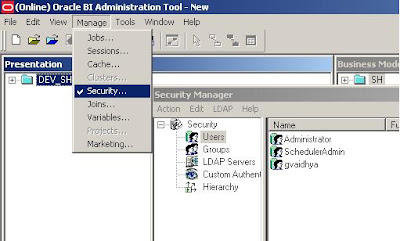
While we are here, a casual user (gvaidhya) can be created as well. This user will be part of a “Casual User” Group.
Start Job Manager, and select Configuration Options.
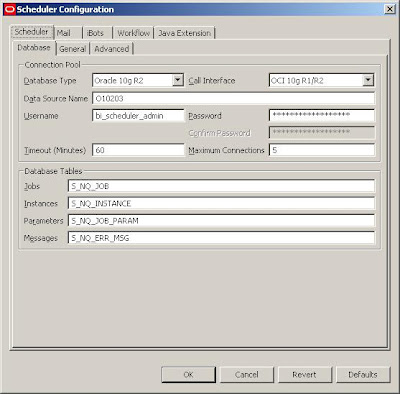
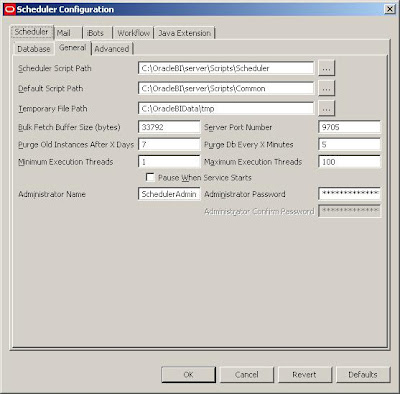

But in order for the iBots to work properly:
1. The Scheduler Administrator credentials should be added to the Oracle BI Presentation Server, Run cryptotools to add the credentials to the BI Presentation server.
2. The BI Presentation Services must be configured to identify the scheduler credentials.
- You may want to encrypt the password, and when asked whether to store the PassPhrase in the xml file? Choose NO. (Recommended).

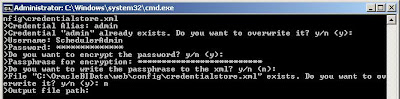
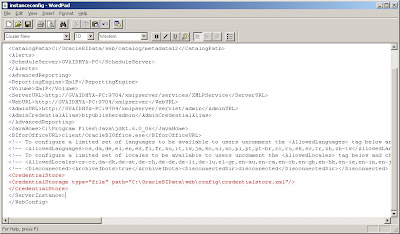 With this, all the setups needed to create and schedule an iBot is Complete.
In order for the Scheduler Admin to be able to have proper access privileges, Add Scheduler Admin user to the “Presentation Services Administrator Group” by going through
Settings-> Administration->Manage Catalog Administration Group and Users. You would encounter
nQSError: 77006 Oracle BI Presentation Server Error. Access Denied.
Error Codes: OKZJNL4

Login to BI Answers as Administrator, create an iBot and schedule it. Add “Casual User” as another Receipient.

In the Schedule tab, you can customize the scheduling of the iBots and other tabs will let you set Delivery Content, Destinations etc. Once scheduled, you should be able to receive iBots.
