I recently came across an interesting challenge: To be able to incrementally merge changes into the OBI repository. Since this is an ongoing process of production support and maintenance, the scenario is all too usual. Migrate change from DEV -> PROD (I’m skipping the QA/TEST environment just for the reasons of brevity). I’m sure you get the point.
PROD is live and well. Now changes are being made to the development environment as part of ongoing maintenance/enhancements. Now, the DEV environment needs to be rolled into production without causing disruption to the production repository.
I was browsing to see if this has been addressed in forums and blogs. Though I came across a couple of articles, they had some issues or the other. One instance suggested a way to add totally new information. In another instance, the delta information resulted in duplicate entries of the previously existing information which required a manual cleanup which is not very ideal. Especially if your repository (rpd) is too big and complex.
I found a tip in the OBIEE Forums where Madan has an elegant solution that works; though Oracle warns that the option is deprecated. The above solution has been explained with nice screen shots here.
I try to address the problem by using the supported, “merge repository” feature. Hopefully, you find this helpful in some ways. I did a test in a fairly complex setting. But for illustration purposes, I took a very simple example scenario and have shown it below.
We are well aware of the “MERGE” feature in OBI Administration tool. We are aware of the Original, Modified and Current Repository and what they all stand for. In my opinion, these terms are too confusing and does not provide a clear meaning to what they really stand for. For instance, Is the Original repository the one I am “currently” using in Production or is it the current repository? Does the Current Repository refer to the freshly updated DEV repository or is that the Original Repository because of the fact that it has all the Updates? or shall we say, “true Original”, since the changes that were not reflected in PROD at the moment invalidates it to be the “Original”? I am going to refer to the repositories in question and coin new names to them that I think will be instantly recognizable.
Current Repository – Hereafter referred to as “Target Repository”: Repository that is “actively” being used in Production. In other words, the target repository is the one that needs to be incrementally updated.
Orignial Repository – Hereafter referred to as “Updated Repository”: Repostiory (usually in DEV/QA that has all the release updates that eventually should be applied to PRODUCTION (i.e. Target Repository).
Modified Repository – Hereafter referred to as “Copy of Updated Repository” : This is a plain copy of the Updated Repository. It’ s the copy of the Updated repository that I am using as the modified repository which “actually” makes sense.
In my example, I take a simplest case of a target repository where a table “SINGLE_TABLE_TEST” exists with one column (COL1). A change has to be made to this by adding a DESCRIPTION column to the table. Once this has been done in the Updated Repository, the Target Repository needs to be updated.

Open the Target Repository in Offline mode.

This slide indicates that the Target Repository currently has just (COL1) as part of the Single_table_test structure.
By Selecting the Merge Option from Files Menu, Open the “Updated Repository” (sh_obiee_usage_track – Copy.rpd) in my example.
In the Merge Repositories window, select the copy of the Updated repository for the “Modified Repository” option. Once you are done, you will see the screen below.
This screen shows the pieces in all the three repository copies. In the middle window, the default description would be “Deleted from Current”. Select “Current” as the decision option.
Once you click “Merge”, you will see the Merged Repository to have just the incremental updates added to the target repository. Just by backing up the “target repository” and renaming the “Merged repository” to target, we now got the incremental updates in Production. In my testing, even the session and environment variables remained unchanged.
If you have any updates/comments/links to enhance this note please feel free to let me know.
Wednesday, January 14, 2009
OBI Repository - Incremental Change Maintenance

Sunday, May 18, 2008
iBot Configuration and Accessing Reports by (Casual) End Users
The setup in the example below consists of OBI Administrator (default “Administrator” id that gets installed with OBI, OBI Scheduler Administrator (SchedulerAdmin), and a casual user (gvaidhya).
For the iBots to executed by the BI Answers framework, the BI Scheduler needs to be configured and running.
The following are the steps to configure BI Scheduler. I came across this nice article while browsing a forum. Though the article is not in English, the images should convey the message.
- Create a new database schema or use an existing schema (If you wish). In my example, the DB schema that holds the objects is named bi_scheduler_admin.
- Log on to the database as the schema owner and execute SAJOBS.
.sql
Now that the database schema to hold the scheduler db objects has been created, you can logon to OBI Administrator Tool to create the SchedulerAdmin user. This is the administrator user that will be managing OBI Scheduler.
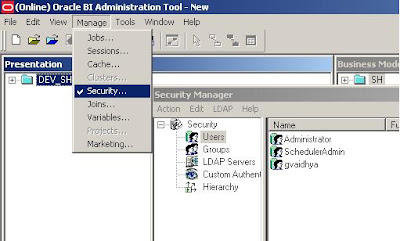
While we are here, a casual user (gvaidhya) can be created as well. This user will be part of a “Casual User” Group.
Start Job Manager, and select Configuration Options.
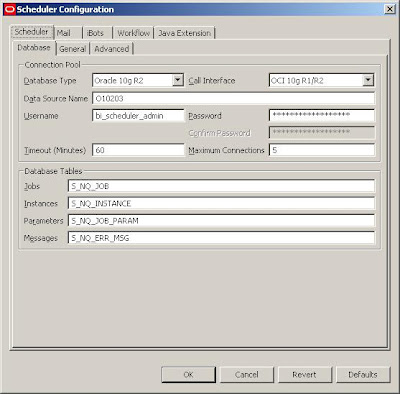
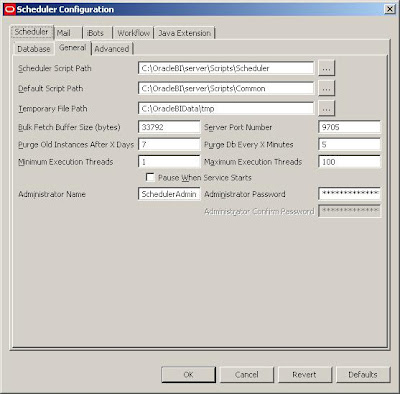

But in order for the iBots to work properly:
1. The Scheduler Administrator credentials should be added to the Oracle BI Presentation Server, Run cryptotools to add the credentials to the BI Presentation server.
2. The BI Presentation Services must be configured to identify the scheduler credentials.
- You may want to encrypt the password, and when asked whether to store the PassPhrase in the xml file? Choose NO. (Recommended).

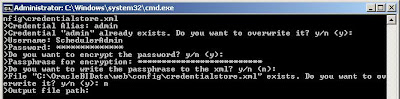
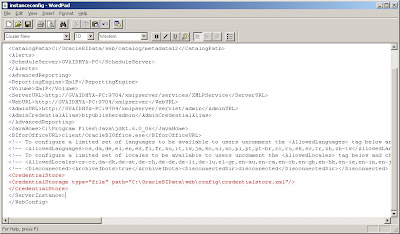 With this, all the setups needed to create and schedule an iBot is Complete.
In order for the Scheduler Admin to be able to have proper access privileges, Add Scheduler Admin user to the “Presentation Services Administrator Group” by going through
Settings-> Administration->Manage Catalog Administration Group and Users. You would encounter
nQSError: 77006 Oracle BI Presentation Server Error. Access Denied.
Error Codes: OKZJNL4

Login to BI Answers as Administrator, create an iBot and schedule it. Add “Casual User” as another Receipient.

In the Schedule tab, you can customize the scheduling of the iBots and other tabs will let you set Delivery Content, Destinations etc. Once scheduled, you should be able to receive iBots.
Sunday, May 4, 2008
OBIEE Connectivity Errors
I recently was testing my new OBIEE setup in a Linux environment.
After the Repository creation (.rpd) file and successful export from Windows OBIEE Admin environment to the Linux environment, (more on some of the issues I faced in these steps later), one of the issues I faced had to do with the inability to run a simple report due to Oracle Library related errors.
Upon connecting to my Presentation Server, I try to pick some data points from my Presentation Catalog and when I tried to execute the report, I got:
Upon reviewing my system settings, user profiles, environment variables I discovered the following to fix the problem. Obiee is the user that owns OBI binaries and ora10db owns the Oracle 10gR2 DB server binaries. The issue really had to do with the group settings for both the binary owners and also the LD_LIBRARY_PATH settings.
[ora10db@linux1 ~]$ id
uid=504(ora10db) gid=503(dba) groups=100(users),503(dba)
LD_LIBRARY_PATH=/apps/10g/ora10db/product/10g/lib:/apps/obiee/OracleBI/server/Bin
PATH=$PATH:/apps/10g/ora10db/product/10g/bin
where /apps/10g/ora10db/product/10g/lib is pointing to the ORACLE_DB_SERVER_HOME lib, and
/apps/obiee/OracleBI/server/Bin points to the OBIEE installation path
And
obiee (user that owns OBIEE) was set to following group permissions
[obiee@linux1 ~]$ id
uid=505(obiee) gid=100(users) groups=100(users),503(dba)
LD_LIBRARY_PATH=/apps/obiee/OracleBI/server/Bin:/apps/10g/ora10db/product/10g/lib
PATH=/usr/kerberos/bin:/usr/local/bin:/bin:/usr/bin:/usr/X11R6/bin:/home/obiee/bin.
As a sidenote, if you encounter the following error:

Check and make sure that you have the service name entries properly defined in the TNS_ADMIN location in the (db server) ORACLE_HOME/network/admin.
