Sunday, May 18, 2008

iBot Configuration and Accessing Reports by (Casual) End Users

Here we will see an example of creating and scheduling iBots and assigning recipients to iBots. I tried to simulate a general production like scenario where the BI Admin, Scheduler Admin and the end user are all different.


The setup in the example below consists of OBI Administrator (default “Administrator” id that gets installed with OBI, OBI Scheduler Administrator (SchedulerAdmin), and a casual user (gvaidhya).
For the iBots to executed by the BI Answers framework, the BI Scheduler needs to be configured and running.
The following are the steps to configure BI Scheduler. I came across this nice article while browsing a forum. Though the article is not in English, the images should convey the message.


  1. Create a new database schema or use an existing schema (If you wish). In my example, the DB schema that holds the objects is named bi_scheduler_admin.


  2. Log on to the database as the schema owner and execute SAJOBS..sql

Now that the database schema to hold the scheduler db objects has been created, you can logon to OBI Administrator Tool to create the SchedulerAdmin user. This is the administrator user that will be managing OBI Scheduler.
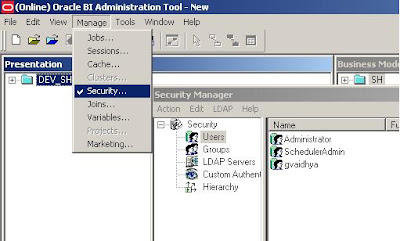


Make sure that this user (SchedulerAdmin) is part of the Administrators Group.
While we are here, a casual user (gvaidhya) can be created as well. This user will be part of a “Casual User” Group.

Next step would be to setup the Configuration Options in the (Job Manager) Scheduler Tool.
Start Job Manager, and select Configuration Options.
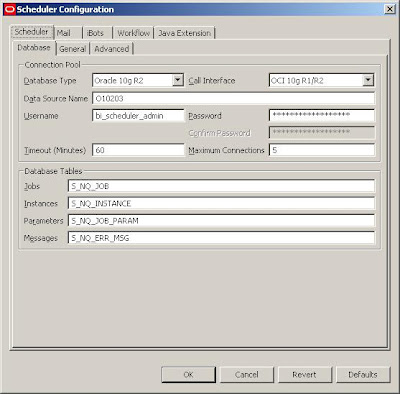
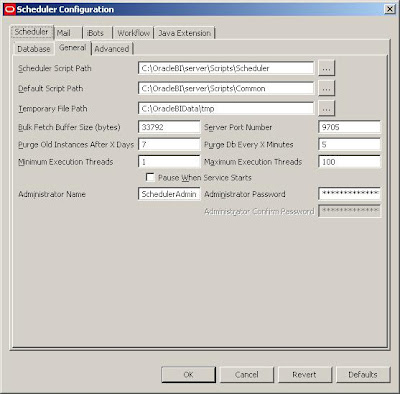
Follow the screenshots below to setup the appropriate tabs. With this the scheduler services should be able to start.

But in order for the iBots to work properly:
1. The Scheduler Administrator credentials should be added to the Oracle BI Presentation Server, Run cryptotools to add the credentials to the BI Presentation server.
2. The BI Presentation Services must be configured to identify the scheduler credentials.

- You may want to encrypt the password, and when asked whether to store the PassPhrase in the xml file? Choose NO. (Recommended).

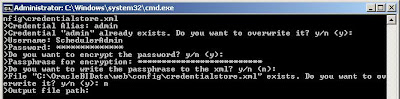
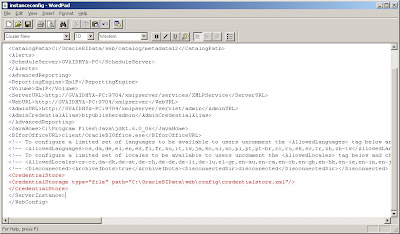
With this, all the setups needed to create and schedule an iBot is Complete.

In order for the Scheduler Admin to be able to have proper access privileges, Add Scheduler Admin user to the “Presentation Services Administrator Group” by going through
Settings-> Administration->Manage Catalog Administration Group and Users. You would encounter

nQSError: 77006 Oracle BI Presentation Server Error. Access Denied.
Error Codes: OKZJNL4


Login to BI Answers as Administrator, create an iBot and schedule it. Add “Casual User” as another Receipient.


In the Schedule tab, you can customize the scheduling of the iBots and other tabs will let you set Delivery Content, Destinations etc. Once scheduled, you should be able to receive iBots.


Sunday, May 4, 2008

OBIEE Connectivity Errors

I recently was testing my new OBIEE setup in a Linux environment.

After the Repository creation (.rpd) file and successful export from Windows OBIEE Admin environment to the Linux environment, (more on some of the issues I faced in these steps later), one of the issues I faced had to do with the inability to run a simple report due to Oracle Library related errors.

Upon connecting to my Presentation Server, I try to pick some data points from my Presentation Catalog and when I tried to execute the report, I got:


Upon reviewing my system settings, user profiles, environment variables I discovered the following to fix the problem. Obiee is the user that owns OBI binaries and ora10db owns the Oracle 10gR2 DB server binaries. The issue really had to do with the group settings for both the binary owners and also the LD_LIBRARY_PATH settings.

[ora10db@linux1 ~]$ id

uid=504(ora10db) gid=503(dba) groups=100(users),503(dba)

LD_LIBRARY_PATH=/apps/10g/ora10db/product/10g/lib:/apps/obiee/OracleBI/server/Bin

PATH=$PATH:/apps/10g/ora10db/product/10g/bin

where /apps/10g/ora10db/product/10g/lib is pointing to the ORACLE_DB_SERVER_HOME lib, and

/apps/obiee/OracleBI/server/Bin points to the OBIEE installation path


And

obiee (user that owns OBIEE) was set to following group permissions


[obiee@linux1 ~]$ id

uid=505(obiee) gid=100(users) groups=100(users),503(dba)

LD_LIBRARY_PATH=/apps/obiee/OracleBI/server/Bin:/apps/10g/ora10db/product/10g/lib

PATH=/usr/kerberos/bin:/usr/local/bin:/bin:/usr/bin:/usr/X11R6/bin:/home/obiee/bin.


As a sidenote, if you encounter the following error:


Check and make sure that you have the service name entries properly defined in the TNS_ADMIN location in the (db server) ORACLE_HOME/network/admin.

Saturday, February 9, 2008

Stored Outlines Last Usage Time

When it comes to Oracle performance tuning, one of the invaluable features that DBAs and Performance experts have in their toolbox is SQL Stored Outlines. Much has been written about stored outlines since it earlier days. One of such interesting articles, can be found here.

Though the supplied PL/SQL package provides many useful routines to play with the outlines, one critical item that is being missed in the package set is a routine to indicate whether a stored outline is consistently being used? And more importantly, when was the last time a stored outline was used? Granted, we can “clear” the stored outlines’ usage and see if it resets to ensure that the outline is being used but that seems too much intrusion to the live production system. While working on this issue, I discovered a simpler way to determine the last time an outline had been used for a given SQL.

With Oracle 10g there has been great improvements in the V$ views area providing a wealth of information without the need to access many V$ views. This tradition has been carried over to 10g R2 as well. The V$SQL view in 10g R2 has new columns that cater to stored outlines. One such column is the LAST_ACTIVE_TIME. By querying the SQL_ID, OUTLINE_CATEGORY, and LAST_ACTIVE_TIME columns from V$SQL you can verify whether a stored outline is being actively used and also the last time it was used.

Here is an example.

NOTE: The outline creation steps are assumed.

11:52:27 SQL> alter session set use_stored_outlines=HV;

Session altered.

11:55:43 SQL> select count(*) from ptn_tab where col2=2;

COUNT(*)
----------
300000
11:56:57 SQL> select name,used from dba_outlines where name='HV';

NAME USED
-------------------- ------
HV USED

11:58:00 SQL> exec dbms_outln.clear_used('HV');

PL/SQL procedure successfully completed.

11:58:10 SQL> select name,used from dba_outlines where name='HV';

NAME USED
-------------------- ------
HV UNUSED
11:58:18 SQL> select count(*) from ptn_tab where col2=2;

COUNT(*)
----------
300000

11:58:59
SQL> select name,used from dba_outlines where name='HV';

NAME USED
-------------------- ------
HV USED

11:59:04 SQL>

1 select sql_id,outline_category,exact_matching_signature,
2 force_matching_signature,last_active_time
3* from v$sql where sql_text like 'select count(*) from ptn_tab%'
11:59:06 SQL> /

SQL_ID OU EXACT_MATCHING_SIGNATURE FORCE_MATCHING_SIGNATURE
------------- -- ------------------------ ------------------------
LAST_ACTIVE_TIME
--------------------
10d6hmvy8t74n HV 0 0
08-FEB-2008 11:58:59